PATGuard Cloud New Users FAQ
Do you offer guidance on how to start using PATGuard Cloud?
Yes. Please refer to our application notes saved here for guidance on how to do this: Getting Started with PATGUARD Cloud
Will I lose my data from PATGuard 3?
No. Providing you still have your PATGuard 3 database, all your data can be imported into PATGuard Cloud at the click of a button.
Please refer to our application note below and watch this short video for guidance on how to do this:
How to import an existing database
How to import a database with PATGuard Cloud
Where can I find my data base from PATGuard 3? Or what if I cannot access PATGuard 3?
You can find where your PATGuard 3 database (mdb file) is currently installed at the top of the Client/Site/Location structure within PATGuard 3.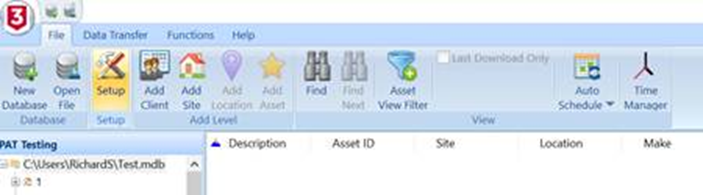
If you are no longer able to access your PATGuard 3 programme you could carry out a Windows search on your PC/Network for the .mdb file.
How do I upload my current database to PATGuard Cloud?
Please refer to our application note below and watch this short video for guidance on how to do this:
How to import an existing database
How to import a database with PATGuard Cloud
Can I still create reports in PATGuard Cloud?
Yes. Please refer to our application note below for guidance on how to do this: How do I download a Report in PATGUARD Cloud?
My testing is due and I need to access my data/create reports straight away. How long will it take to set up PATGuard Cloud?
This really depends on the size of the PATGuard 3 database you are importing. On average, please allow 5-15 minutes to complete the import.
What subscription has the same features as PATGuard 3?
PATGuard Cloud Standard package is the closest like-for-like version to PATGuard 3 and it has some great new additional features.
A full listing of the different packages and features available can be viewed here: PATGuard Cloud - Plans
What version of PATGuard Cloud do I need for my tester?
If you are currently using manual testers with no memory (for example our PrimeTest 50 or PrimeTest 100) then PATGuard Cloud Basic is the best version for manual data entry.
If you have a tester that has onboard memory (for example our Apollo series of testers) then you would require PATGuard Cloud Standard as a minimum, but you could also use the Business or Enterprise version depending on the features you require.
How much data will I need?
If you currently have a PATGuard 3 database, simply find your access database (.mdb file), right click and select properties and this will show you the size of your current database which will give an indication of what memory is required.
I have a MAC computer. Can I use this for PATGuard Cloud?
Yes. Please refer to our application note for guidance: Can I use PATGUARD Cloud on a Mac Device?
Can I try the PATGuard Cloud software before signing upto a subscription?
Yes. You can sign up for an unrestricted 14-day free trial of PATGuard Cloud. *Please note that if you do not go ahead with a subscription after the free 14-day trial, you will lose any data saved on the software.
Sign up for free here: PATGuard Cloud
How many users can access the PATGuard Cloud software?
Each individual user will require a subscription to access the software. Your subscription will need to be updated before adding a new user. Please refer to our application notes below for guidance on how to do this:
How do I update my PATGUARD Cloud subscription
How to add a new user in PATGUARD Cloud
To ensure you are on the right subscription you can arrange a demo call with a member of our team: Book a Demo - PATGuard Cloud
What support is available to me if I have any questions?
There is a full knowledge base available for PATGuard Cloud users that can be found here: PATGuard Cloud Knowledge Base
We also have our technical support team, simply raise a support ticket here: Raise a Support Ticket | Support | Seaward
If you would like a demo of the PATGuard Cloud software before subscribing, we can offer a call with a member of our team: Book a Demo - PATGuard Cloud

I'd like to talk to a sales advisor



Sign up to our Newsletter.
Stay up to date with the latest industry and product news, as well as our free educational content such as webinars and our expert guides.
Close